
Amazon UPC Codes
Everything you need to know about barcodes and how they are used on Amazon. There is no difference between the UPC codes we provide for Amazon and for any other platform — this page covers Amazon listings specifically.
Bulk discount
Up to 10% off 25+ UPC codes with code
Get Your UPC Codes
Choose the number of UPC or EAN codes you need
Secure checkout
Need 10, 100 or 1,000+ codes? View bulk pricing
- One UPC code per Amazon listing, including every variation
- GS1 originated — accepted by Amazon Seller Central
- Delivered by email, usually within 15 minutes
- Step-by-step listing tutorial further down this page
Works on







How many codes do you need for Amazon?
Before you buy, be clear on one thing: every product you list on Amazon needs its own barcode. If your products have variations, each variation needs its own barcode as well.
Choose your package
UPC code packages and prices
Our best-selling packages, bought by thousands of sellers. Usually emailed within 15 minutes, one-time payment, no renewals.
| Package | Price | Per code | Codes delivered | Buy |
|---|---|---|---|---|
|
Buy 1 UPC Code
Selected package Buy 1 UPC CodeTry a single code $4.59 $9.99
|
$4.59 $9.99 | $4.59 per code | 456+ codes | Add to cart |
|
Buy 5 UPC Codes
Selected package Buy 5 UPC CodesPerfect for testing $9.99 $15.00
|
$9.99 $15.00 | $2.00 per code | 2.1k+ codes | Add to cart |
|
Buy 10 UPC Codes
Selected package Buy 10 UPC CodesGreat for small sellers $15.00 $25.00
|
$15.00 $25.00 | $1.50 per code | 7.3k+ codes #3 best seller | Add to cart |
|
Buy 25 UPC Codes
Selected package Buy 25 UPC CodesBest for growing brands $24.75 $45.00
|
$24.75 $45.00 | $0.99 per code | 2.2k+ codes | Add to cart |
|
Buy 50 UPC Codes
Selected package Buy 50 UPC CodesScale your catalogue $33.49 $55.00
|
$33.49 $55.00 | $0.67 per code | 54.1k+ codes #2 best seller | Add to cart |
|
Buy 100 UPC Codes
Most popular
Selected package Buy 100 UPC CodesFor serious sellers $44.00 $75.00
|
$44.00 $75.00 | $0.44 per code | 212.3k+ codes #1 best seller | Add to cart |
|
Buy 200 UPC Codes
Selected package Buy 200 UPC CodesBulk listings $78.59 $100.00
|
$78.59 $100.00 | $0.39 per code | 10.8k+ codes | Add to cart |
|
Buy 300 UPC Codes
Selected package Buy 300 UPC CodesBulk listings $89.00 $126.00
|
$89.00 $126.00 | $0.30 per code | 12.3k+ codes | Add to cart |
|
Buy 500 UPC Codes
Best value
Selected package Buy 500 UPC CodesBulk listings $123.00 $150.00
|
$123.00 $150.00 | $0.25 per code | 41k+ codes | Add to cart |
|
Buy 750 UPC Codes
Selected package Buy 750 UPC CodesWholesale volume $163.00 $180.00
|
$163.00 $180.00 | $0.22 per code | Add to cart | |
|
Buy 1,000 UPC Codes
Selected package Buy 1,000 UPC CodesWholesale volume $225.00 $230.00
|
$225.00 $230.00 | $0.23 per code | 40k+ codes | Add to cart |
|
Buy 1,500 UPC Codes
Selected package Buy 1,500 UPC CodesWholesale volume $240.00 $255.00
|
$240.00 $255.00 | $0.16 per code | Add to cart | |
|
Buy 2,000 UPC Codes
Selected package Buy 2,000 UPC CodesWholesale volume $255.00 $300.00
|
$255.00 $300.00 | $0.13 per code | Add to cart | |
|
Buy 2,500 UPC Codes
Selected package Buy 2,500 UPC CodesWholesale volume $295.00 $350.00
|
$295.00 $350.00 | $0.12 per code | Add to cart | |
|
Buy 3,000 UPC Codes
Selected package Buy 3,000 UPC CodesWholesale volume $330.00 $390.00
|
$330.00 $390.00 | $0.11 per code | Add to cart | |
|
Buy 4,000 UPC Codes
Selected package Buy 4,000 UPC CodesWholesale volume $475.00 $549.00
|
$475.00 $549.00 | $0.12 per code | Add to cart | |
|
Buy 5,000 UPC Codes
Selected package Buy 5,000 UPC CodesWholesale volume $490.00 $550.00
|
$490.00 $550.00 | $0.10 per code | Add to cart | |
|
Buy 7,500 UPC Codes
Selected package Buy 7,500 UPC CodesWholesale volume $650.00 $750.00
|
$650.00 $750.00 | $0.09 per code | Add to cart | |
|
Buy 10,000 UPC Codes
Selected package Buy 10,000 UPC CodesWholesale volume $775.00 $900.00
|
$775.00 $900.00 | $0.08 per code | 300k+ codes | Add to cart |
|
Buy 25,000 UPC Codes
Selected package Buy 25,000 UPC CodesWholesale volume $1,700.00 $2,000.00
|
$1,700.00 $2,000.00 | $0.07 per code | Add to cart | |
|
Buy 50,000 UPC Codes
Selected package Buy 50,000 UPC CodesWholesale volume $2,900.00 $3,500.00
|
$2,900.00 $3,500.00 | $0.06 per code | Add to cart | |
|
Buy 75,000 UPC Codes
Selected package Buy 75,000 UPC CodesWholesale volume $3,600.00 $4,500.00
|
$3,600.00 $4,500.00 | $0.05 per code | Add to cart | |
|
Buy 100,000 UPC Codes
Selected package Buy 100,000 UPC CodesWholesale volume $4,200.00 $5,000.00
|
$4,200.00 $5,000.00 | $0.04 per code | Add to cart |
Need 200,000 codes or more? Contact us for a quote
How to list your product on Amazon using our UPC codes
Six steps, from signing in to Seller Central to keeping a record of your codes. These are simplified illustrations, so labels can differ slightly in your account. Tap an image to see it full size.
-
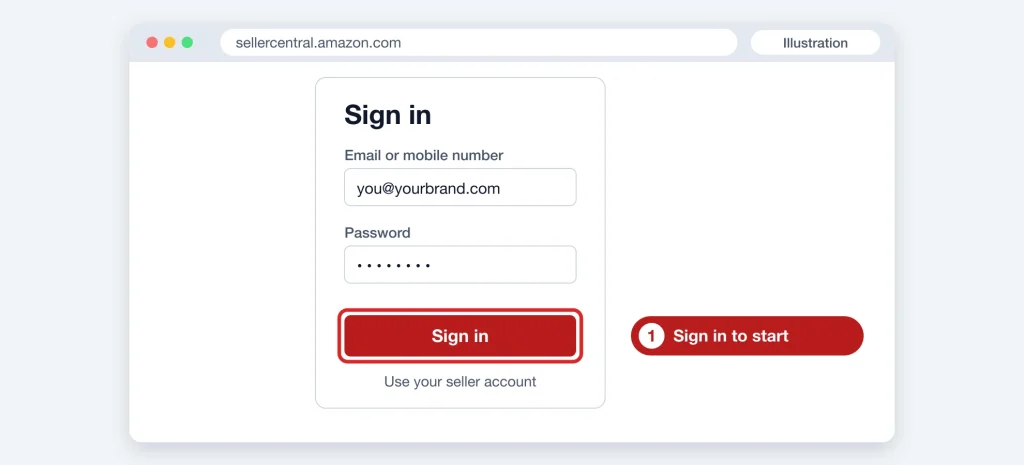
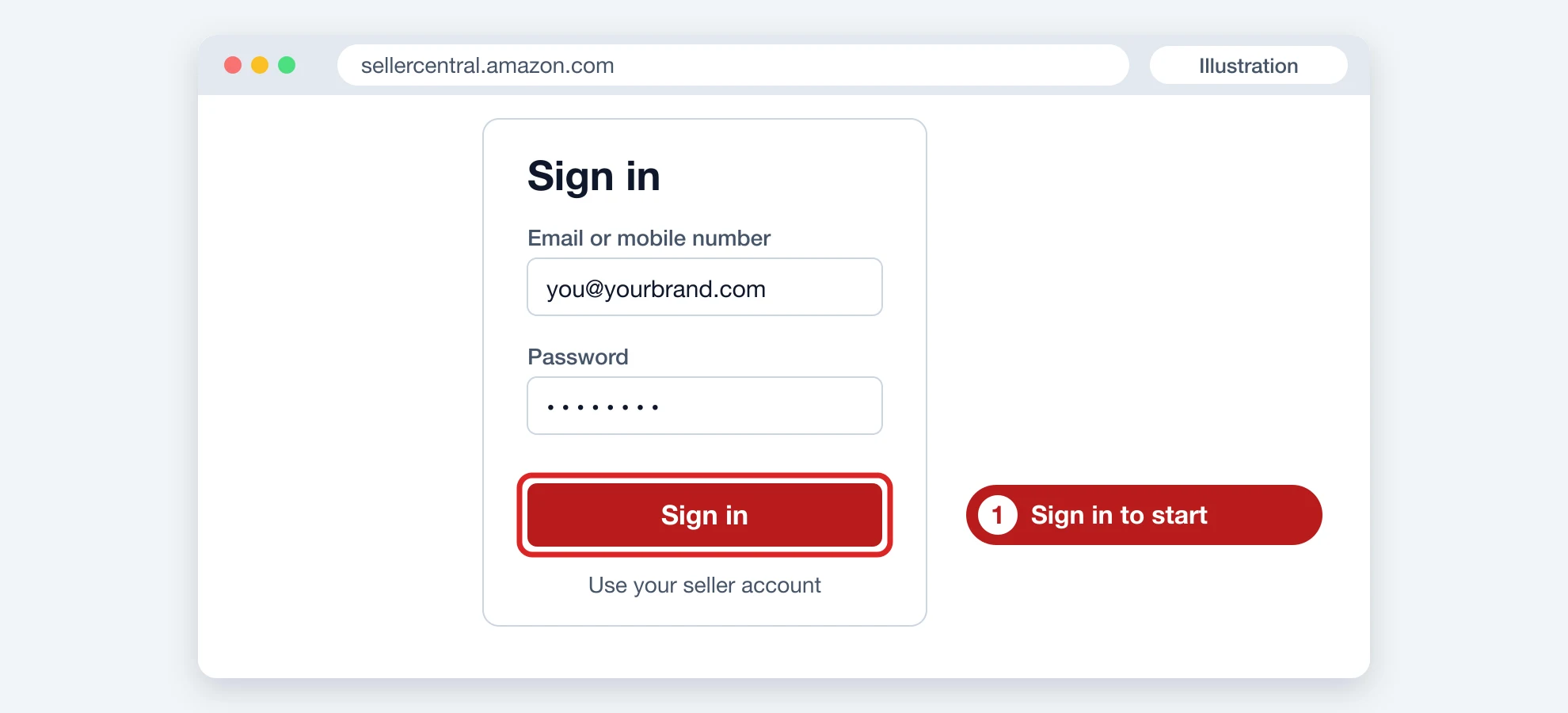
Sign in to Seller Central
Go to sellercentral.amazon.com, or click Log in on sell.amazon.com, and sign in with your seller account. You need an active selling plan before you can add products.
-
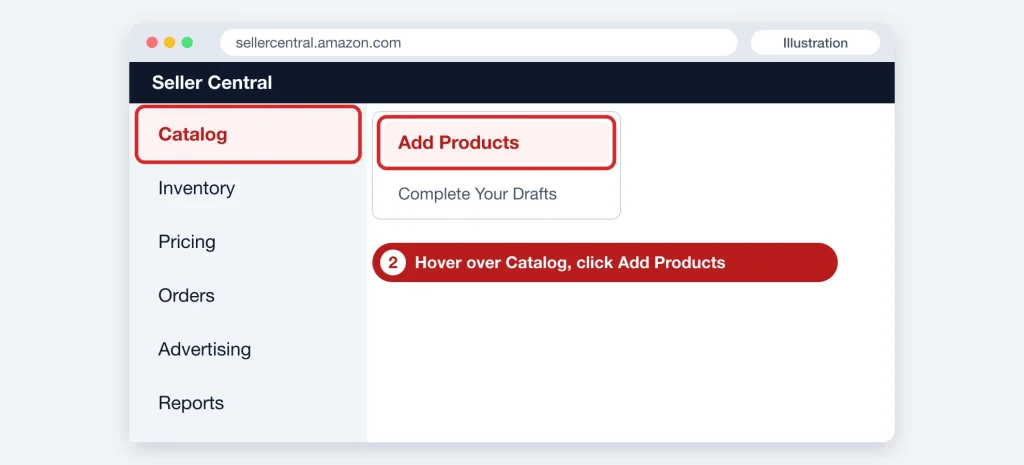
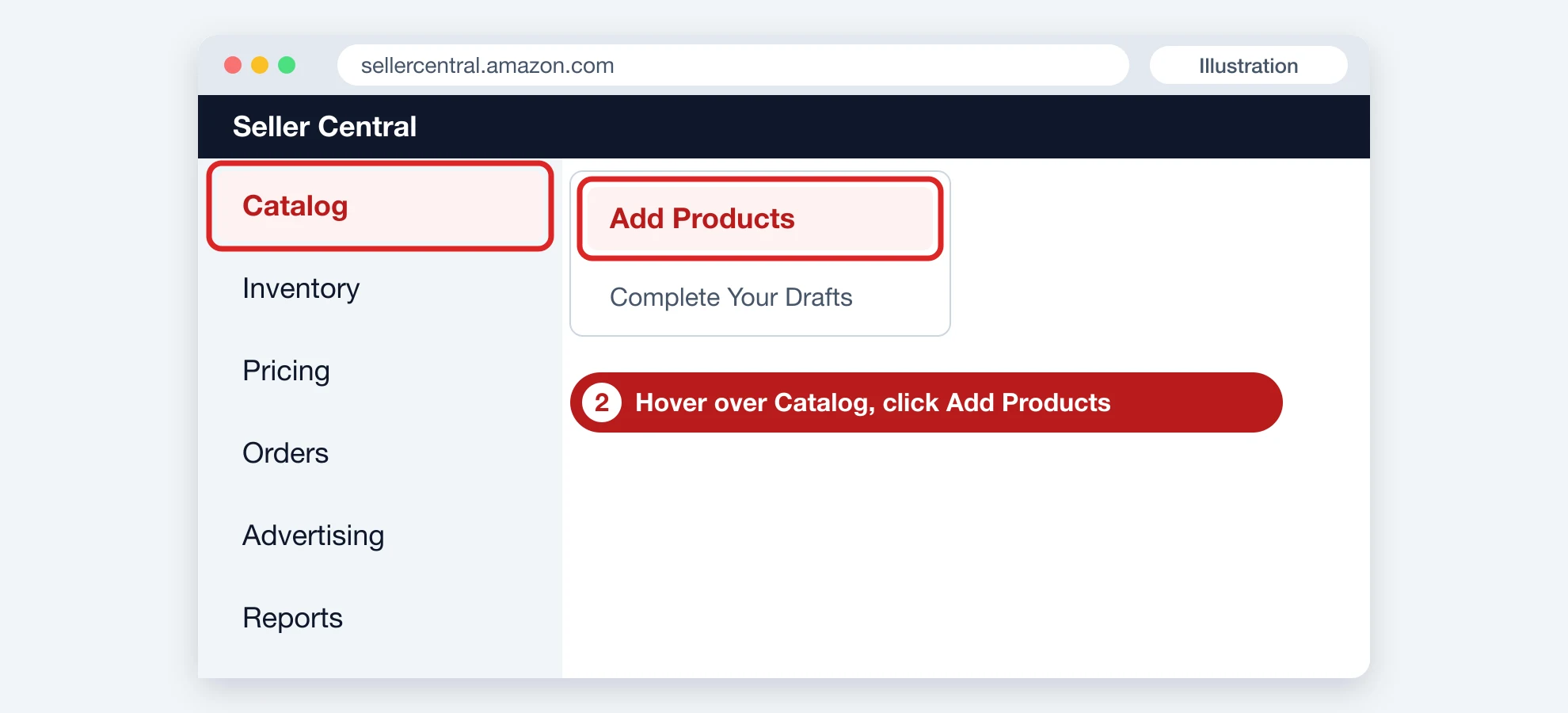
Open Add Products
Hover over Catalog in the main menu, then click Add Products. Search your UPC or product name to check whether the item is already in Amazon's catalog.
-
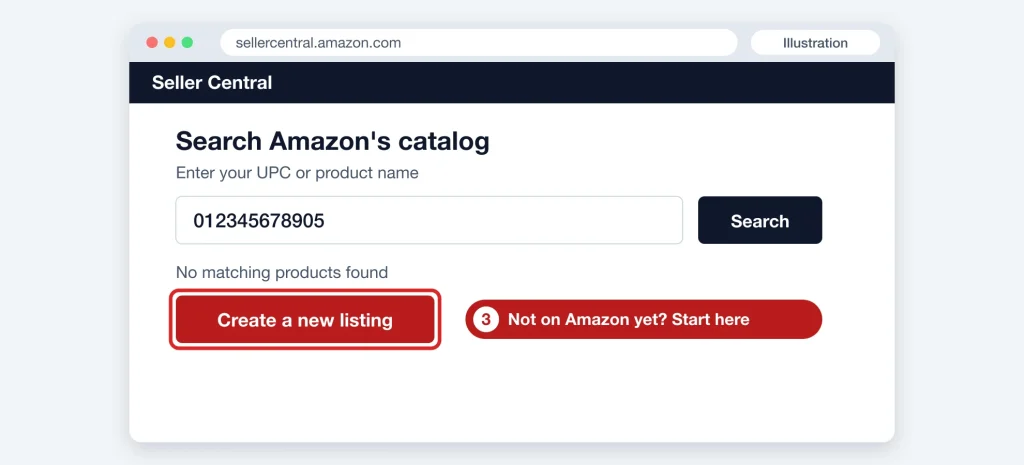
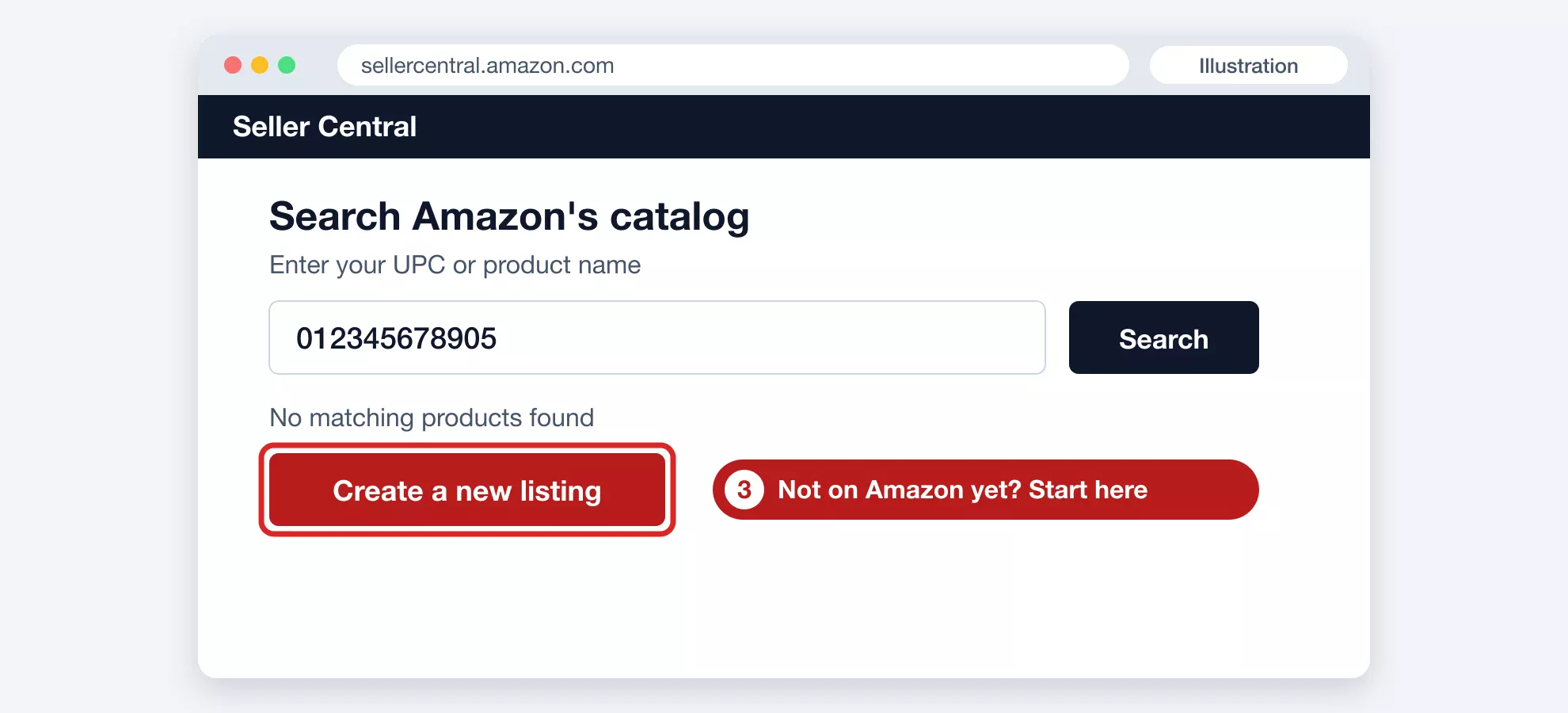
Start a new listing
If your product isn't there, click Create a new listing under the search field. Some accounts may show “I'm adding a product not sold on Amazon” instead. Pick the closest product type and continue.
-
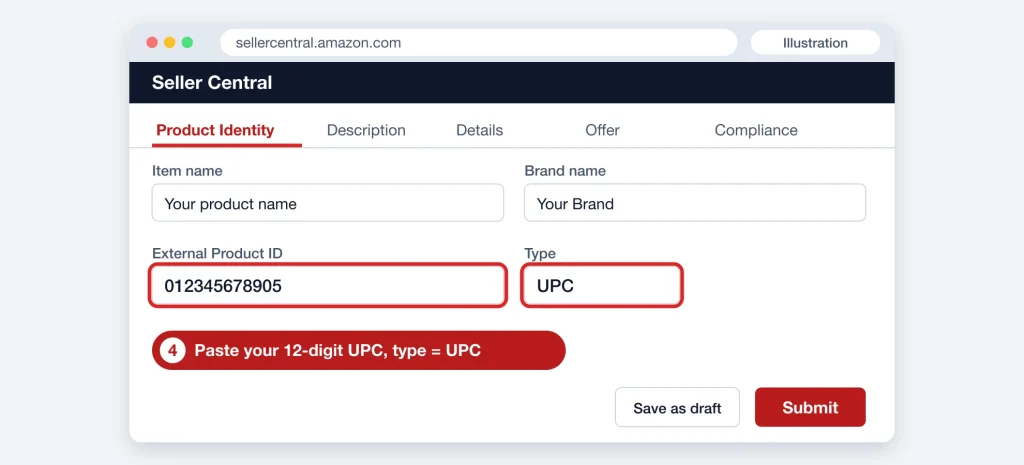
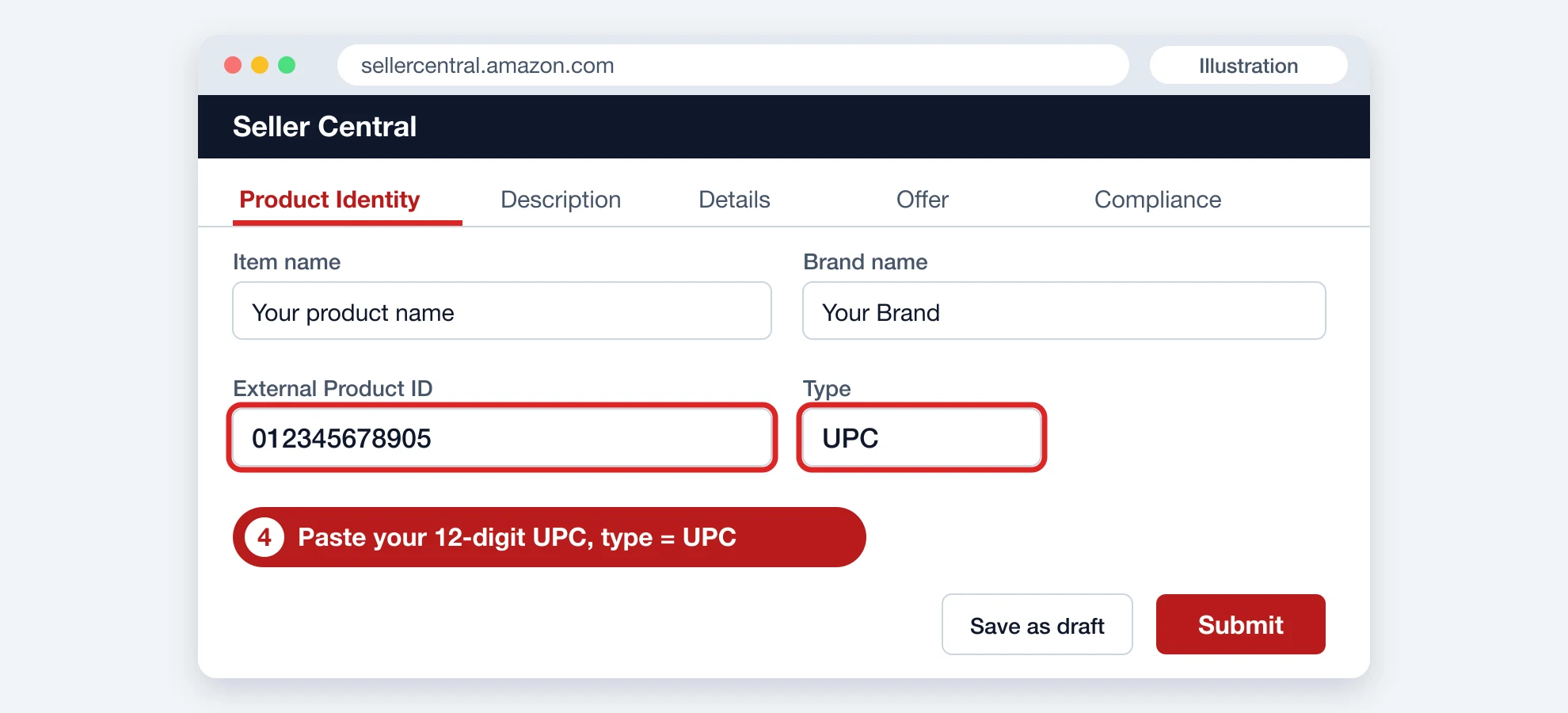
Enter your UPC as product ID
In the Product Identity tab, find External Product ID. Paste your 12-digit UPC, set the type to UPC and enter your brand name. Complete the other tabs, then click Submit, or Save as draft to finish later.
-
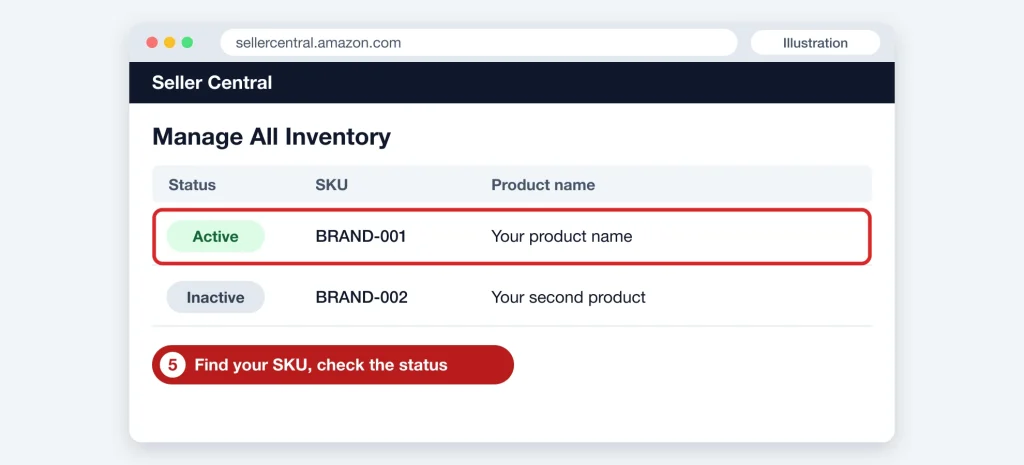
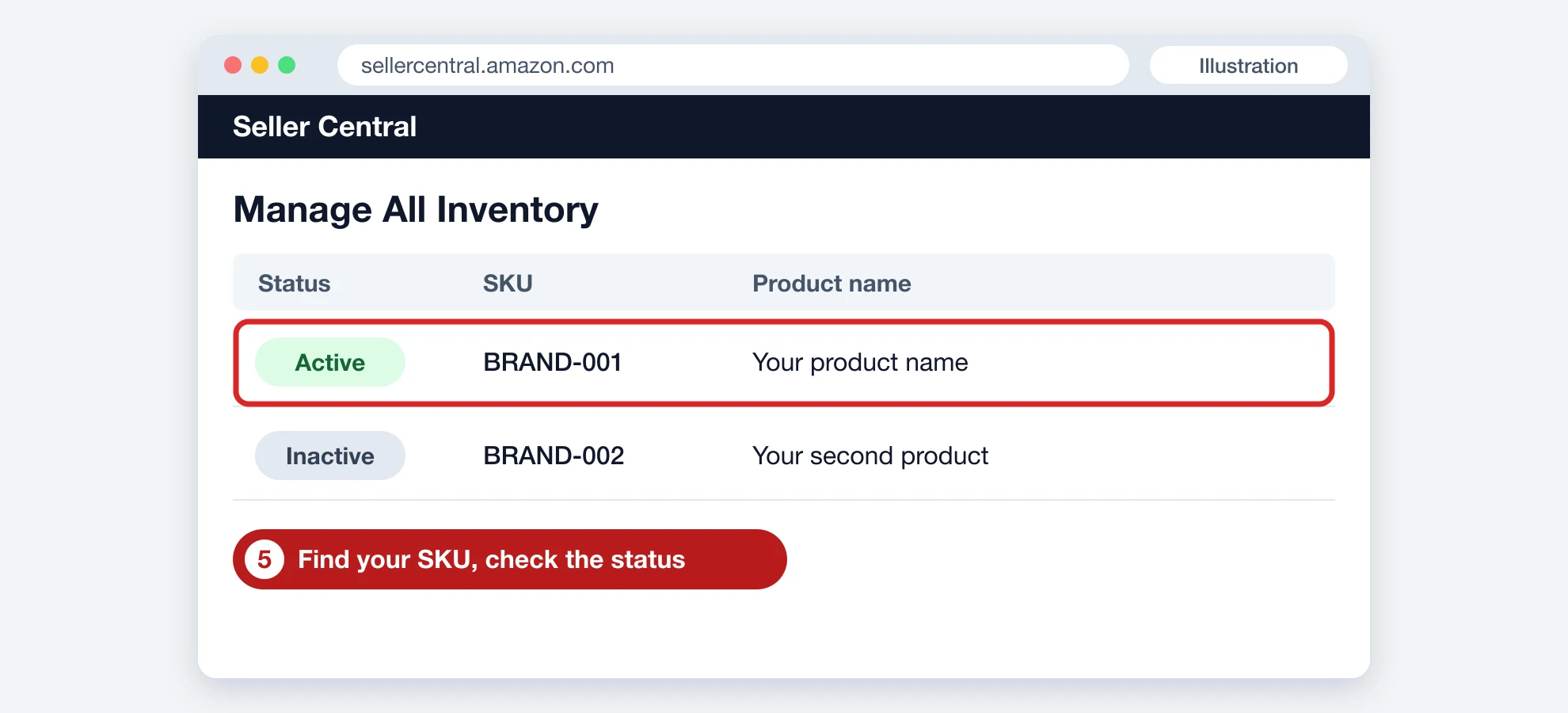
Check the listing status
Go to Inventory, then Manage All Inventory, and find your SKU. A new listing can take time to appear, and an FBA listing can show as inactive until Amazon receives your stock. If Amazon rejects the code, see the errors below.
-
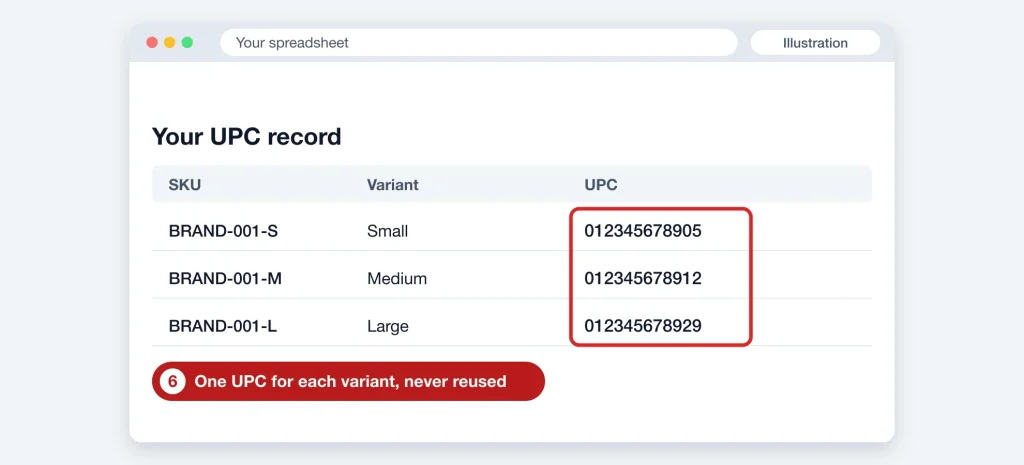
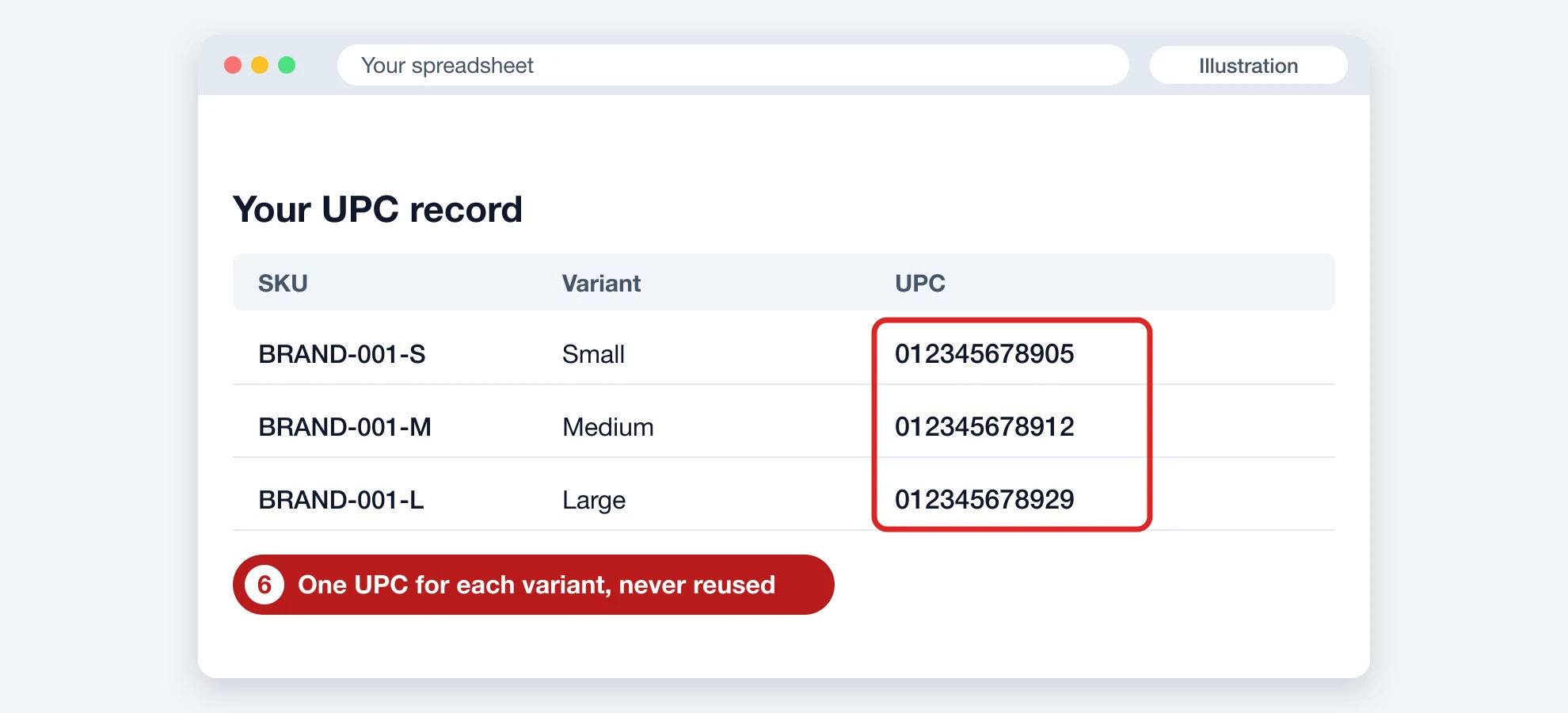
Keep a record of your codes
Note which UPC went on which SKU in a simple spreadsheet. Each size, color or pack variant needs its own UPC, and a code should never move to a different product.
Amazon listing errors and how to fix them
The errors Amazon sellers hit most when adding a UPC, what each one means, and the fix.
What does Amazon error 8572 mean?
Amazon’s message reads: “You are using UPCs, EANs, ISBNs, ASINs, or JAN codes that do not match the products you are trying to list.”
- Check the code was typed correctly with our check digit calculator.
- Make sure the code hasn’t already been used on a different product.
- If the error stays, apply for a GTIN exemption (for your own brand or a generic product).
- If you think one of our codes is faulty, contact us and we’ll look at it.
What does Amazon error 5665 mean?
Amazon hasn’t approved the brand name you entered. This is about the brand, not the barcode, but it often shows up at the same time as a UPC problem.
- Enroll your brand in Amazon Brand Registry, which needs a pending or active trademark.
- No trademark? Follow the link in the error message to request permission to use the brand name. Amazon usually asks for photos showing the brand printed on the product or packaging.
- Check the brand is spelled exactly the same everywhere in your listing.
What does Amazon error 5461 mean?
You don’t have permission to create new product pages for this brand. It usually appears when the brand is registered in Brand Registry by someone else, or when your own Brand Registry account isn’t linked to your selling account.
- Check the brand name for spelling and spacing differences.
- If it’s your brand, link your Brand Registry and selling accounts.
- If it’s someone else’s brand, ask the brand owner for a selling role, or complete the selling application shown in the error.
A new UPC won’t fix 5461. It’s a brand permission issue.
What does Amazon error 8541 mean?
Your UPC (or another detail such as brand or title) matches an ASIN that already exists, but the data you sent is different from what Amazon has on that page.
- If it really is the same product, list it using the existing ASIN instead of your UPC.
- If it’s a different product, you’ve likely used a code that’s already taken. Check for typos with our check digit calculator, then use a different, unused UPC.
- If you only need to fix one field, edit it in Manage Inventory to match Amazon’s value.
Why does Amazon say my UPC doesn't match my brand?
Our codes are genuine GS1-issued numbers. If Amazon flags a listing, send us the exact message and we’ll help you sort it out.
If that happens, your options are:
- Apply for a GTIN exemption, which lets you list your own brand without a barcode.
- Buy your codes from GS1 US directly, if you’d like your own company prefix.
Many sellers list with resold codes without trouble, but we can’t promise every listing will be accepted.
Why does Amazon say my product ID is invalid?
Usually the code was mistyped or the wrong product ID type was picked.
- A UPC has 12 digits. Choose UPC as the type. An EAN has 13 digits and needs the type EAN.
- Don’t paste spaces or dashes, and don’t drop leading zeros.
- The last digit is a check digit. Run the code through our check digit calculator to catch typos.
- Codes copied from a spreadsheet can lose leading zeros or turn into scientific notation. Format the column as text.
Can I use one UPC for two products or variations?
No. Each product, and each size or color of a product, needs its own UPC. Reusing a code, or reusing a SKU with a different UPC, causes conflicts with the existing ASIN and errors like 8541 or 8572.
- Give every variation its own code and SKU.
- If a listing was created with the wrong code, delete it and create it again with a new SKU and the correct UPC.
- Keep a simple list of which code went on which product so you never reuse one.
GetUPCCode or GS1 US?
Both options give you real, GS1-issued barcode numbers. The difference is price, and who the numbers are registered to.
| GetUPCCode | GS1 US (direct) | |
|---|---|---|
| Price for 10 codes | $15, one time | $250 first year |
| Price for 100 codes | $44, one time | $750 first year |
| Yearly fee | None | $50 a year (10 codes) or $150 a year (100 codes) |
| Accepted by major retail chains (Walmart stores, Target, Kroger) | Usually no. Most chains require your own GS1 company prefix | Yes |
| Amazon listings | Yes | Yes |
| Delivery | By email, usually within 15 minutes (up to 6 hours) | In your GS1 US online account after you sign up |
GS1 US also sells a single GTIN for $30 with no yearly fee. If you plan to sell in big-box stores or you have a registered brand on Amazon, buy from GS1. If you’re testing a product, selling online, or keeping costs low, our codes are a cheaper place to start.
UPC, EAN, GTIN, FNSKU, ASIN: what’s the difference?
The product IDs you’ll meet in Seller Central, in one line each.
What is a UPC?
A UPC (Universal Product Code) is the 12-digit barcode number used on products sold in the US and Canada. On Amazon it’s the most common product ID for new listings. It’s also called a GTIN-12.
What is an EAN?
An EAN (European Article Number) is a 13-digit barcode number used outside North America. It’s also called a GTIN-13. Amazon accepts EANs in every marketplace. A 12-digit UPC becomes a valid EAN by adding a 0 in front.
What is a GTIN?
GTIN (Global Trade Item Number) is the family name for barcode numbers managed by GS1. It covers UPC (GTIN-12), EAN (GTIN-13), GTIN-14 for cases and GTIN-8 for small items. Amazon’s forms often say “GTIN” or “Product ID” to mean any of these.
What is an FNSKU?
An FNSKU (Fulfillment Network SKU) is a barcode Amazon creates for units you send to its warehouses with Fulfillment by Amazon (FBA). It’s free and made after the listing exists. It doesn’t replace a UPC: you still need a UPC or a GTIN exemption to create the listing.
What is an ASIN?
An ASIN (Amazon Standard Identification Number) is a 10-character ID Amazon gives each product page. For most products it starts with B0. Amazon creates it when you list a new product with a UPC or GTIN exemption. You can’t buy an ASIN, and it only works on Amazon.
What is an ISBN?
An ISBN (International Standard Book Number) is the ID for books. Amazon asks for an ISBN, not a UPC, when you list a book. In the US, ISBNs are sold by Bowker. Our UPC codes aren’t meant for books.
What is a GTIN exemption?
A GTIN exemption is Amazon’s permission to list a product without a UPC or EAN. It’s meant for your own brand, generic products, handmade items and some parts. You apply in Seller Central, usually with photos showing the brand on the product and packaging. It’s also the fix when Amazon won’t accept a resold code for your brand.
What is a UPC code, and how do you buy cheap UPC codes?
The most common question asked is what UPC codes are and where to buy them. UPC barcodes are for sellers who want to sell their products on online platforms such as Amazon, Walmart, eBay, Etsy and iTunes.
A UPC code, or Universal Product Code, is a unique identity that stores information about your product. With a UPC barcode label, anyone can scan your barcode and get that product’s information.
Still have a question?
Ask us anything about UPC codes, delivery or payments. We reply within 24 hours.